Building a GPS photo map with Hugo, Leaflet, and exifr
How to build an interactive map for a Hugo static site that reads GPS coordinates directly from image EXIF data and plots photo markers alongside a GPX route — with all the gotchas.
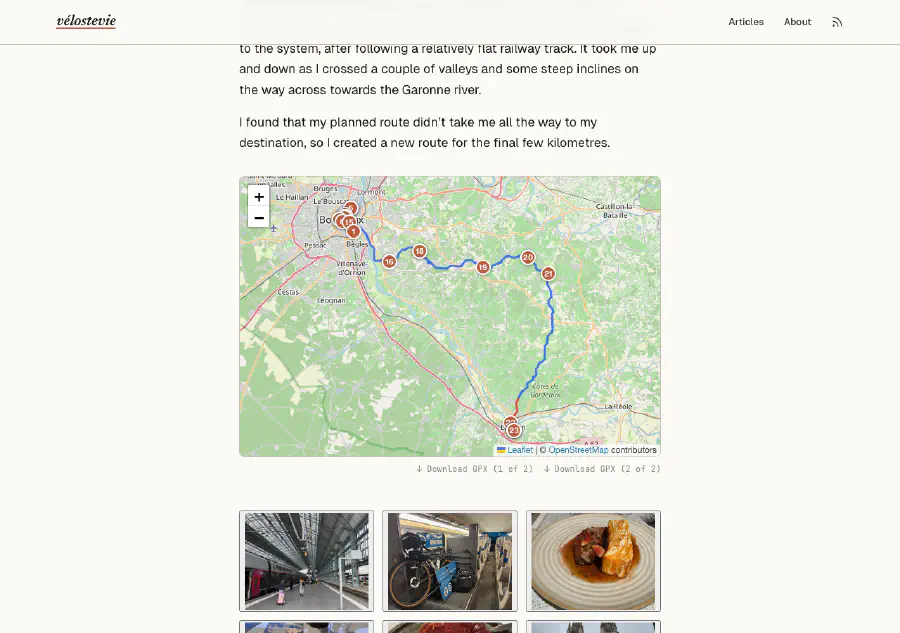
On my cycling blog Velostevie each trip article includes an interactive map showing the GPX route and numbered markers for every photo taken along the way. Clicking a marker opens the photo in a lightbox. The whole thing is a Hugo static site — no server, no database — so the map has to be built from static files.
This post walks through the architecture: a Hugo shortcode that wires up the data, a vanilla JavaScript IIFE that uses Leaflet for the map and exifr to extract GPS coordinates from image EXIF metadata, and the non-obvious gotchas I ran into along the way.
What we’re building
The end result looks like this:
- A Leaflet map is embedded in each article page.
- If the article directory contains a
.gpxfile, the route is drawn as a polyline. - If the article has a
gallery/folder, each photo that has GPS metadata embedded gets a numbered circular marker at its location on the map. - Clicking a marker opens the photo in the site’s lightbox.
- If there’s no GPX file, the map still renders and fits itself to the bounds of the photo markers.
The shortcode is called like this in the article’s index.md:
{{< gpxmap gallery="images/articles/2025/canal-des-deux-mers/2025-09-01_cdm_day_01/gallery" >}}Architecture overview
The design is split cleanly across two phases:
| Phase | Where | What happens |
|---|---|---|
| Build time | Hugo shortcode (gpxmap.html) | Finds GPX files and photo paths, encodes them as data-* attributes on a <div> |
| Runtime | JavaScript (gpxmap.js) | Reads those attributes, initialises Leaflet, fetches GPX, reads EXIF GPS from photos |
Hugo templates run at build time with no access to the browser. JavaScript runs in the browser with no access to Hugo’s template context. The data-* attributes on the map <div> are the handoff point between the two.
The Hugo shortcode
The full shortcode lives at layouts/shortcodes/gpxmap.html:
{{- $isSection := eq .Page.Kind "section" -}}
{{- $gpxFiles := .Page.Resources.Match "*.gpx" -}}

{{- /* On section pages, aggregate GPX files from all child articles */ -}}
{{- if $isSection -}}
  {{- range .Page.RegularPages.ByDate -}}
    {{- range .Resources.Match "*.gpx" -}}
      {{- $gpxFiles = $gpxFiles | append . -}}
    {{- end -}}
  {{- end -}}
{{- end -}}

{{- /* On single pages, build photo URL list from gallery param */ -}}
{{- $dir := .Get "gallery" -}}
{{- $photoUrls := slice -}}
{{- if and (not $isSection) $dir -}}
  {{- $files := readDir (printf "static/%s" $dir) -}}
  {{- range $files -}}
    {{- if not (hasPrefix .Name ".") -}}
      {{- $photoUrls = $photoUrls | append (printf "%s/%s" $dir .Name) -}}
    {{- end -}}
  {{- end -}}
{{- end -}}

{{- if or $gpxFiles $photoUrls -}}
  {{- $urls := slice -}}
  {{- range $gpxFiles -}}
    {{- $urls = $urls | append .Permalink -}}
  {{- end -}}
  {{- $absPhotoUrls := slice -}}
  {{- range $photoUrls -}}
    {{- $absPhotoUrls = $absPhotoUrls | append (absURL .) -}}
  {{- end -}}
  <div class="gpx-block">
    <div class="gpx-map"
      {{- with $urls }} data-gpx-files="{{ delimit . "|" }}"{{- end }}
      {{- with $absPhotoUrls }} data-photos="{{ delimit . "|" }}"{{- end }}></div>
    {{- if and (not $isSection) $gpxFiles -}}
    <div class="gpx-download">
      {{- range $i, $f := $gpxFiles -}}
        {{- $label := "Download GPX" -}}
        {{- if gt (len $gpxFiles) 1 -}}
          {{- $label = printf "Download GPX (%d of %d)" (add $i 1) (len $gpxFiles) -}}
        {{- end -}}
        <a href="{{ $f.Permalink }}" download="{{ $f.Name }}" class="gpx-download-link">↓ {{ $label }}</a>
      {{- end -}}
    </div>
    {{- end -}}
  </div>
{{- end -}}
A few things worth noting:
GPX files are page bundle resources. They live in the same directory as index.md and are accessed via .Page.Resources.Match "*.gpx". Their .Permalink gives an absolute URL that the browser can fetch().
Photo paths are read from the filesystem. readDir lists the contents of static/<gallery>/ at build time. Each path is then converted to an absolute URL using absURL.
Section pages aggregate GPX from all children. The shortcode can be dropped on a series _index.md to show the whole route across all days.
The shortcode renders nothing if there’s no data. If there are no GPX files and no gallery, the <div> is not emitted at all.
Gotcha 1: absURL and leading slashes
This one cost me most of the debugging time.
absURL takes a path and prepends the site’s baseURL. The trap is that if you pass a path with a leading /, Hugo treats it as absolute from the domain root and strips the base URL subpath. This matters when the site lives at a subpath (e.g. GitHub Pages at https://username.github.io/repo-name/).
{{- /* Wrong — leading slash strips the subpath */ -}}
{{- absURL "/images/articles/foo/bar.png" -}}
{{- /* → https://username.github.io/images/articles/foo/bar.png */ -}}

{{- /* Correct — path-relative, subpath is preserved */ -}}
{{- absURL "images/articles/foo/bar.png" -}}
{{- /* → https://username.github.io/repo-name/images/articles/foo/bar.png */ -}}
Since the gallery paths come from readDir they don’t start with /, so the fix was simply not to prepend one.
Gotcha 2: canonifyURLs doesn’t touch data-* attributes
Hugo’s canonifyURLs = true setting rewrites root-relative URLs in standard HTML attributes (href, src, etc.) to absolute URLs. It does not touch data-* attributes. Any URL passed to JavaScript via a data- attribute must be made absolute in the template itself — as we do above with absURL.
Gotcha 3: Go template URL-encodes attributes whose name contains "url"
Go’s html/template package has a security rule: any HTML attribute whose name contains the substring url is treated as a URL context and its value is URL-encoded. This will silently mangle a pipe-delimited list of paths.
{{- /* Dangerous — Go will URL-encode the value because the name contains "url" */ -}}
<div data-photo-urls="{{ delimit $absPhotoUrls "|" }}"></div>

{{- /* Safe — no "url" substring in the attribute name */ -}}
<div data-photos="{{ delimit $absPhotoUrls "|" }}"></div>
The fix is to choose attribute names that don’t contain url. I use data-gpx-files and data-photos.
Loading the scripts
The Leaflet CSS, Leaflet JS, exifr, and gpxmap.js should only load on pages that actually use the shortcode — there’s no point adding that weight to every page.
Hugo’s .HasShortcode method makes this easy. In layouts/_default/baseof.html:
<head>{{ partial "head.html" . }}</head>
<body>
  ...
  {{- if .HasShortcode "gpxmap" }}
  <script src="/leaflet/leaflet.js" defer></script>
  <script src="/exifr/exifr-lite.umd.js" defer></script>
  {{ $gpxMapJs := resources.Get "js/gpxmap.js" | minify | fingerprint }}
  <script src="{{ $gpxMapJs.RelPermalink }}" integrity="{{ $gpxMapJs.Data.Integrity }}" defer></script>
  {{- end }}
</body>
And the Leaflet CSS in layouts/partials/head.html:
{{- if .HasShortcode "gpxmap" }}
<link rel="stylesheet" href="/leaflet/leaflet.css">
{{- end }}
Leaflet and exifr are served locally from static/leaflet/ and static/exifr/ — not from a CDN. This keeps the site self-contained and avoids third-party dependencies.
Important: do not add crossorigin="" to locally-served script tags. For same-origin resources, it triggers a CORS preflight that will fail. The attribute is only needed for cross-origin resources.
The JavaScript
The full script is an IIFE (Immediately Invoked Function Expression) — no ES modules, no bundler required.
(function () {
function parseGPX(xmlText) {
var parser = new DOMParser();
var doc = parser.parseFromString(xmlText, 'application/xml');
var pts = doc.getElementsByTagName('trkpt');
return Array.from(pts).map(function (pt) {
return [parseFloat(pt.getAttribute('lat')), parseFloat(pt.getAttribute('lon'))];
});
}
function addPhotoMarkers(map, el, onBoundsReady) {
var raw = el.dataset.photos;
if (!raw || typeof exifr === 'undefined') {
if (onBoundsReady) onBoundsReady(L.latLngBounds());
return;
}
var urls = raw.split('|').filter(Boolean);
var photoBounds = L.latLngBounds();
var remaining = urls.length;
function done() {
remaining--;
if (remaining === 0 && onBoundsReady) onBoundsReady(photoBounds);
}
urls.forEach(function (url, i) {
exifr.gps(url).then(function (gps) {
if (!gps || !gps.latitude || !gps.longitude) { done(); return; }
var filename = decodeURIComponent(url.split('/').pop());
var caption = filename.replace(/\.[^.]+$/, '').replace(/[_-]+/g, ' ');
var num = i + 1;
var marker = L.marker([gps.latitude, gps.longitude], {
icon: L.divIcon({
className: 'photo-marker',
html: '<span class="photo-marker-label">' + num + '</span>',
iconSize: [22, 22],
iconAnchor: [11, 11]
})
}).addTo(map);
photoBounds.extend([gps.latitude, gps.longitude]);
marker.bindTooltip(caption, { direction: 'top', offset: [0, -14] });
marker.on('click', function () {
var triggers = document.querySelectorAll('.lb-trigger');
for (var j = 0; j < triggers.length; j++) {
try {
if (decodeURIComponent(triggers[j].dataset.src) === decodeURIComponent(url)) {
triggers[j].click();
break;
}
} catch (e) { /* malformed URI — skip */ }
}
});
done();
}).catch(function () { done(); });
});
}
function initMap(el) {
var map = L.map(el);
L.tileLayer('https://{s}.tile.openstreetmap.org/{z}/{x}/{y}.png', {
attribution: '© <a href="https://www.openstreetmap.org/copyright">OpenStreetMap</a> contributors',
maxZoom: 19
}).addTo(map);
var gpxRaw = el.dataset.gpxFiles;
var gpxUrls = gpxRaw ? gpxRaw.split('|').filter(Boolean) : [];
if (gpxUrls.length === 0) {
addPhotoMarkers(map, el, function (photoBounds) {
if (photoBounds && photoBounds.isValid()) {
map.fitBounds(photoBounds, { padding: [40, 40] });
}
});
return;
}
var colors = ['#2563eb', '#dc2626'];
var bounds = L.latLngBounds();
var pending = gpxUrls.length;
addPhotoMarkers(map, el, null);
gpxUrls.forEach(function (url, i) {
fetch(url)
.then(function (res) { return res.text(); })
.then(function (text) {
var coords = parseGPX(text);
if (coords.length) {
var poly = L.polyline(coords, {
color: colors[i % colors.length],
weight: 3,
opacity: 0.85
}).addTo(map);
bounds.extend(poly.getBounds());
}
})
.finally(function () {
pending--;
if (pending === 0 && bounds.isValid()) {
map.fitBounds(bounds, { padding: [20, 20] });
}
});
});
}
if (typeof L !== 'undefined') {
document.querySelectorAll('.gpx-map').forEach(initMap);
}
})();GPX parsing: getElementsByTagName, not querySelectorAll
GPX files declare a default XML namespace (e.g. xmlns="http://www.topografix.com/GPX/1/1"). In a namespaced document, querySelectorAll('trkpt') finds nothing because CSS selectors don’t match namespaced elements without a namespace prefix. getElementsByTagName('trkpt') ignores the namespace and works correctly.
URL normalisation when matching photos to lightbox triggers
The marker click handler needs to find the matching lightbox trigger element for the photo. Both the data-photos attribute on the map <div> and the data-src attribute on lightbox triggers carry URLs — but one may have literal spaces in filenames and the other may have %20. The comparison silently fails unless both sides are normalised with decodeURIComponent.
Async GPS reads and fitBounds
exifr.gps(url) is asynchronous. In photo-only mode (no GPX file), fitBounds must not be called until all GPS reads have completed — otherwise you’re fitting to an empty or incomplete bounds object. The onBoundsReady callback pattern ensures fitBounds only runs once all the promises have settled.
Gotcha 4: exifr — use the full build, not the lite build
The exifr library comes in two builds: a lite build and a full build. The lite build supports JPEG EXIF data but not PNG GPS. If your gallery images are PNGs (as mine are, exported from an iPhone), you must use the full build.
The file in this project is named exifr-lite.umd.js but is actually the full build — I replaced the lite build with node_modules/exifr/dist/full.umd.js and kept the original filename. Worth checking if you’re copying this pattern.
Embedding GPS metadata in photos
For photo markers to appear, images need GPS coordinates embedded in their EXIF data. Modern smartphone photos include this automatically if location services are enabled during capture. If you’re exporting from a photo management app, make sure the export includes location metadata.
To check which images are missing GPS data, I wrote a small shell script:
#!/usr/bin/env bash
# scripts/check-gps.sh
# Lists gallery images that are missing GPS metadata.

find static/images -type f \( -iname "*.jpg" -o -iname "*.jpeg" -o -iname "*.png" \) | while read -r f; do
  lat=$(exiftool -s3 -GPSLatitude "$f" 2>/dev/null)
  if [ -z "$lat" ]; then
    echo "NO GPS: $f"
  fi
done
Run it from the project root:
./scripts/check-gps.shDeployment note: Cloudflare Pages vs GitHub Pages
This site originally deployed to GitHub Pages, which serves Hugo sites at a subpath (https://username.github.io/repo-name/). That subpath causes all the URL generation headaches described above.
I switched to Cloudflare Pages, which serves the site at a clean root domain — https://velostevie.com/ — with no subpath. This eliminates an entire class of URL problems. Cloudflare also deploys automatically on every push to main with no extra workflow configuration needed.
If you are deploying a Hugo site with data-* attributes carrying URLs and you have flexibility over your hosting, Cloudflare Pages is the simpler choice.
Summary
Here’s the full approach in brief:
- Hugo shortcode runs at build time: finds
.gpxpage bundle resources and reads the gallery directory listing, converts both to absolute URLs, emits them asdata-gpx-filesanddata-photoson a<div>. baseof.htmluses.HasShortcode "gpxmap"to conditionally load Leaflet, exifr, and the map script — only on pages that need it.gpxmap.jsreads the data attributes, initialises a Leaflet map, fetches and parses each GPX file, then callsexifr.gps()on each photo to get its coordinates and place a marker.- Marker clicks trigger the lightbox via
decodeURIComponent-normalised URL matching.
The trickiest parts were all URL-related: absURL with path-relative inputs, canonifyURLs not touching data-* attributes, Go template URL-encoding attribute names, and URL normalisation in JavaScript. Once those were understood the architecture itself is fairly straightforward.
The source is available on GitHub at stephen-masters/velostevie.